How Does a CO2 Laser Cutter Work | Why Knowing This Saves You Time, Material, and Money
How does a CO2 laser cutter work? Start with the physics: electricity excites a sealed mix of carbon dioxide, nitrogen, and helium gas. That reaction amplifies light between a set of mirrors and produces an invisible 10.6-micron infrared beam. A focusing lens narrows that beam to a spot as small as 0.1–0.2 mm. A CNC system steers it along your design, and concentrated heat melts, burns, or vaporizes the material in its path.
That's the mechanism and it's worth knowing, because it explains everything else in this guide: which materials you can run, how much machine you actually need, and where your money goes after the invoice clears. CO2 remains the workhorse choice for sign shops, makerspaces, and small manufacturers cutting wood, acrylic, leather, and fabric. Whether you're filling Etsy orders on a desktop unit or scaling a small manufacturing line, the same physics governs your results, and you'll buy and run your machine with more confidence than most people in this market do. Laser Machine Warehouse explains CO2 laser technology through hand-tested desktop and industrial cutters, curated for makers, hobbyists, and small businesses seeking precision.
Inside the Machine: Anatomy and Resonator Types
CO2 laser technology explained in five steps no guesswork required:
- Excitation - Electricity energizes the gas mix. Nitrogen hands its energy off to CO2 molecules.
- Photon avalanche - Excited molecules release photons, which trigger further releases in a chain reaction.
- Amplification - Mirrors at each end of the tube bounce light back and forth, building intensity with every pass.
- Emission - A fraction of that light escapes as your working beam. Helium carries away the excess heat and resets the cycle.
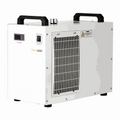
- Delivery - Mirrors route the beam, a lens focuses it to a point, and a water chiller keeps the tube from overheating.

|
Resonator |
Best for |
Typical life |
|
Sealed glass tube |
Desktop machines, hobbyists |
2,000–10,000 hrs |
|
RF-excited |
Fine detail, faster pulsing |
Longer, pricier |
|
Fast-axial-flow |
Multi-kilowatt industrial cutting |
Continuous duty |
|
TEA (pulsed) |
Specialty marking (high peak power) |
Varies by duty cycle |
If you're running a desktop machine (40–150W), you're running a sealed glass tube that's simply what the category uses. Industrial systems step up to RF or flowing-gas resonators, built for round-the-clock duty cycles.
From Design File to Finished Cut
Every job yours included follows the same six-step laser tube cutting process. No shortcuts, no exceptions:
- Design a vector file (SVG, DXF, AI) in your CAD/CAM software.
- Convert it to G-code, which sets path, speed, and power.
- Fire the tube as the CNC gantry moves.
- Guide the beam through the mirrors and focusing lens down to a micron-scale spot on the material.
- Cutting the beam's heat removes material along the path.
- Clear the kerf with assist gas, keeping debris and flare-ups out of the way.
Keep the optics clean and the alignment tight, and your thousandth part will match your first. That consistency is the entire value proposition of this process.
Why CO2 Cuts Some Materials and Not Others
Materials that absorb 10.6-micron light convert it to heat and cut cleanly wood, paper, leather, fabric, and plastics like acrylic all fall into this category. Bare metals aluminum, copper, brass do the opposite: they reflect the beam instead of absorbing it. That's the entire reason standard CO2 machines can't cut them, and why stray reflections are a genuine safety hazard, not a theoretical one.
Absorption alone won't get you a clean cut, though. Glass, stone, and tile absorb the beam well enough to engrave but push for a full-depth cut, and their brittleness works against you: the heat required to cut through cracks them first. On standard machines, treat these as engrave-only materials. Full stop.
Power vs. speed determines which operation you get:
- Cutting: high power, slow speed, full penetration
- Engraving: moderate power, faster speed, set depth
- Marking: low power, high speed, surface color change only
| Material | Cut | Engrave |
| Wood, plywood, MDF | Yes | Yes |
| Acrylic | Yes | Yes |
| Paper, cardboard | Yes | Yes |
| Leather, fabric | Yes | Yes |
| Glass, stone, tile | No | Yes |
| Anodized/coated metal | No | Mark only |
| Bare metal | No | No |
Two quality measures tell you everything about how clean your cut really is: kerf width and heat-affected zone (HAZ). Kerf width is the material the beam removes typically 0.1 – 0.3 mm. HAZ is the discolored edge heat leaves behind. Get your focus sharp and your assist gas right, and you control both.
Rough cutting capacity by wattage (wood/acrylic) use this as your baseline:
| Wattage | 40W | 60W | 100W | 150W |
| Max thickness | 3 mm (⅛") | 6 mm (¼") | 12 mm (½") | 20 mm (¾") |
These are baselines, not guarantees of actual capacity shifts with material, speed, and number of passes. Test your own settings before you commit a production run.
Never cut these, no matter how tempting the material on hand: PVC or vinyl release corrosive chlorine gas. Polycarbonate discolors and ignites. ABS and fiberglass throw off toxic fumes and hazardous dust. Check the safety data sheet before every new material, and test on scrap first. This isn't optional.
CO2 vs. Fiber vs. Diode: Which Fits Your Shop?
Before you compare spec sheets, get this straight: the CO2 laser vs fiber laser decision with diodes as the budget-friendly third option comes down to what material pays your bills, not marketing claims.
|
CO2 |
Fiber |
Diode |
|
|
Wavelength |
10.6 µm |
~1.06 µm |
~0.45 µm |
|
Best for |
Non-metals |
Metals |
Light engraving, thin wood |
|
Metal cutting |
Poor* |
Excellent |
Marking only |
|
Source life |
2,000–10,000 hrs |
50,000+ hrs |
10,000+ hrs |
|
Upfront cost |
Moderate |
Highest |
Lowest |
*High-power industrial CO2 with oxygen assist can cut mild steel, a different machine class.
The decision is simpler than it looks. If your revenue runs on wood, acrylic, leather, or glass, CO2 is the stronger investment full stop. If it runs on steel, aluminum, or brass, fiber is the right call. Plenty of shops eventually run both: CO2 for signage and packaging, fiber for metal parts and serial numbers. The smart move is to start with the machine that matches your current product line, then add the second as that line grows.
Read our full CO2 laser vs fiber laser buying guide for a breakdown of cost, safety, and material fit before you decide.
Why Shops Choose CO2
No tool wear. The beam never touches your material, no clamping pressure, no distortion. Acrylic edges come out flame-polished, every time.
Fine detail, guaranteed. Small text and intricate patterns cut clean, with little to no sanding or polishing required afterward.
One machine, every job. Wood, acrylic, leather, fabric, paper, and rubber signage, packaging, prototyping, education all on the same platform.
Trade-offs to plan around:
- Glass tubes need replacing every 2,000–10,000 hours fiber sources outlast them by a wide margin.
- The system is sensitive to heat and vibration. One bumped gantry knocks your mirrors out of alignment.
- Wall-plug efficiency runs lower 10–20% versus 30%+ for fiber so expect to draw more power per watt of usable beam.
- Optics demand regular cleaning and alignment. Build it into your routine.
None of these are deal-breakers. They belong in your maintenance budget, not on your list of reasons to hesitate.
What It Actually Costs to Run
|
Cost driver |
What to expect |
|
Tube replacement |
A few hundred dollars up, more for RF |
|
Consumables (lenses, mirrors, nozzles) |
Every few months under heavy use |
|
Electricity + assist gas |
Ongoing, compressed air for most shops |
Your maintenance rhythm, non-negotiable: clean the lens daily. Check chiller water before every session. Clean mirrors and rails weekly. Inspect alignment monthly.
|
Symptom |
Likely cause |
Fix |
|
Charring |
Slow speed, weak air assist, dirty lens |
Speed up, boost airflow, clean lens |
|
Incomplete cuts |
Misfocus, dirty optics, low power |
Refocus, clean, realign |
|
Tube won't fire |
No coolant flow, loose connection, failed supply |
Check chiller/interlocks, inspect wiring, test supply |
Safety is not optional: CO2 lasers are Class 4 devices. The open beam can injure eyes and skin and ignite material that risks not shrinking because you've run the machine a hundred times before. Enclosed machines with interlocked lids operate as Class 1 systems, but revert to Class 4 the moment the cover opens. Vent fumes outdoors or through filtration. Wear 10.6 µm-rated eyewear whenever the enclosure is open. Keep an extinguisher within reach, and never leave a running machine unattended, no exceptions. The standards that govern this: IEC 60825-1, ANSI Z136.1, OSHA laser guidance, and, for U.S. sales, FDA/CDRH 21 CFR 1040.10.
Choosing the Right Machine for You
Match the machine to your materials and your volume. The highest wattage on the spec sheet is not the answer your job list is.
|
Factor |
What to consider |
|
Wattage |
40–60W for thin wood/acrylic/paper; 80–150W for thicker stock and speed |
|
Bed size |
Your largest workpiece + floor space |
|
Tube type |
Glass = lower upfront cost; RF = longer life, finer detail |
|
Budget tier |
Hobbyist desktop → 80–100W small business → industrial RF |
Every laser tube cutting process starts with the right machine, comparing desktop and industrial CO2 laser cutters by wattage, bed size, and tube type.
Built for Sign Shops, Makers, and Manufacturers
Whatever you make and however you sell it, CO2 already fits your workflow:
- Manufacturing & signage: acrylic signage, packaging prototypes, custom parts, gaskets, filter media
- Education: repeatable, hands-on STEM and design projects
- Makers & small business: personalized wood, leather, and acrylic goods
Frequently Asked Questions
How many years does a CO₂ laser last?
A CO₂ laser tube typically lasts 2,000–10,000 hours, or roughly 1–5+ years, depending on usage, cooling, tube quality, and operating conditions.
How much does a CO₂ laser cutting machine cost?
Laser Machine Warehouse currently lists CO₂ machines from about $2,309.99 for a 55W Uimoso to $8,999 for a 130W OneLaser Cobra; the xTool P3 is $6,999.
Which material should you never cut in the laser cutter?
PVC, vinyl, and chlorine-containing materials should never be laser-cut because they can release hazardous/corrosive fumes and damage the machine.
What is the thickest a laser cutter can cut?
There is no universal maximum. It depends on laser power and material. The xTool P3 80W cuts up to 20mm basswood and 25mm acrylic in one pass.
What is the best laser cutter to buy?
For small-business production, the xTool P3 is a strong choice: 80W CO₂ power, 36×18-inch workspace, 1,200mm/s speed, and automated features.
Is xTool a Chinese company?
Yes. xTool is owned by Makeblock, and company filings identify its operations as originating in Shenzhen, China.
What is better, xTool or Glowforge?
For cutting power, speed, and workspace, xTool P3 leads: 80W vs. 45W, 36×18 vs. about 19.5×11 inches. Glowforge emphasizes a simpler ecosystem and U.S.-made Performance models.
Ready to Find Your Machine?
You now know how a CO2 laser cutter works, which materials it can and can't cut, and exactly what it costs to keep one running. That's more than most buyers walk in with. The next step is matching wattage and bed size to the jobs you actually run, not the biggest machine on the page. Browse the full Laser Machine Warehouse catalog of precision-tested laser cutters and engravers, built in Hudsonville, Michigan for makers who demand reliable, professional results.
Browse in-stock CO2 laser cutters and engraving machines, from entry-level desktop models to 130W industrial systems ready to cut, engrave, and ship today.
Sources: IEC 60825-1; ANSI Z136.1 (Laser Institute of America); FDA/CDRH 21 CFR 1040.10; OSHA Technical Manual, Laser Hazards chapter.
Laser Machine Warehouse LLC
- Phone: +1 (877) 473-4397
- Email: wjcmarketplace@gmail.com
- Address: 2222 W Grand River Rd Ste. A, Owosso, Michigan 48867, United States